Crafting Depth: A Practical Guide to the Multilayer Sea Shadow Box 3D SVG Cut File
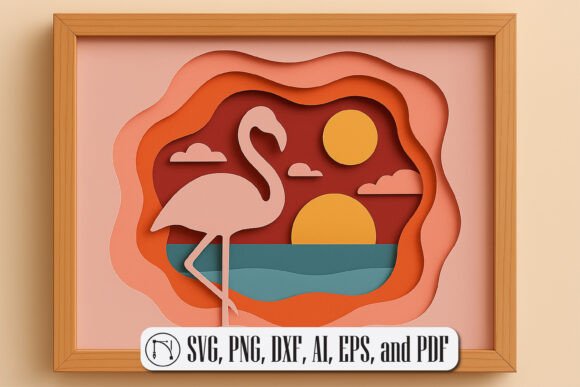
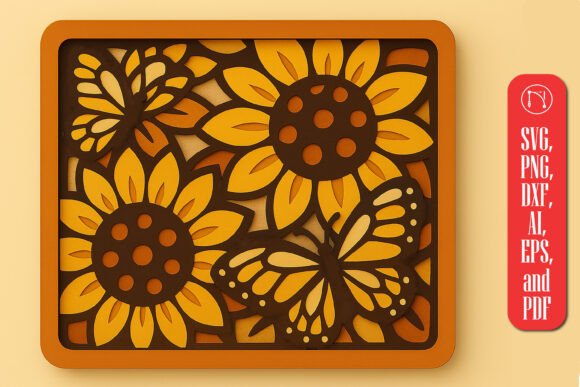
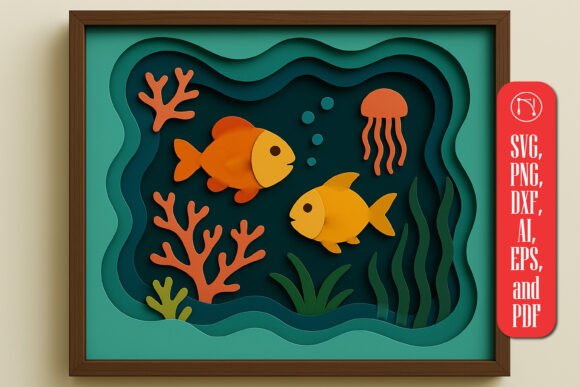
Integrating digital assets into physical craft projects requires more than just a cutting machine; it demands a clear understanding of layering, material compatibility, and assembly logic. The Multilayer Sea Shadow Box 3D SVG Cut File represents a sophisticated intersection of digital design and tactile artistry. For creators, small business owners, and hobbyists, this asset is not merely a image file but a structured blueprint for building depth. By bringing the serenity and mystery of the deep sea into your workspace, this design allows you to produce professional-grade wall decor, nursery art, and light boxes with consistent quality.
Understanding how to effectively utilize this specific digital file involves looking beyond the initial download. It requires a workflow that respects the intricacies of 3D paper engineering or laser cutting. Whether you are using a Cricut, Silhouette, Brother ScanNCut, or Glowforge, the success of your final product depends on how well you prepare, cut, and assemble the layered components. This guide explores the practical implementation of the sea scene design, focusing on efficiency, material selection, and the integration of this asset into broader creative or commercial workflows.
Pre-Production Planning and File Preparation
Before sending any data to your cutting machine, proper file preparation is critical. The Multilayer Sea Shadow Box 3D SVG Cut File comes in multiple formats, including SVG, PNG, DXF, AI, EPS, and PDF. Choosing the right format for your specific software ecosystem is the first step in ensuring a smooth process. For users of vector-based software like Adobe Illustrator or CorelDRAW, the AI or EPS files provide the most flexibility for editing anchor points or adjusting dimensions without losing resolution. Conversely, those using proprietary crafting software will find the SVG format most reliable for maintaining layer integrity.
One of the key features of this design is that the files are pre-layered and labeled. This organization is vital for efficient workflow management. Instead of manually separating elements like fish, turtles, corals, and waves, you can rely on the provided structure. However, a prudent creator will always inspect the layers before cutting. Check for any stray nodes or overlapping paths that might cause the blade to drag or the laser to burn unnecessarily. This quality control step prevents material waste and ensures that each component fits precisely during assembly.
Consider the scale of your project at this stage. The design is versatile, suitable for small gift boxes or large wall installations. Adjusting the dimensions in your design software should be done proportionally to maintain the aesthetic balance between the foreground elements, such as the marine life, and the background waves. If you plan to create a light box, ensure that the negative spaces are large enough to allow light to pass through effectively, enhancing the 3D effect.
Material Selection and Machine Compatibility
The versatility of the Multilayer Sea Shadow Box 3D SVG Cut File lies in its adaptability to various materials. While cardstock is the most common medium for paper shadow boxes, the design also works exceptionally well with wood veneer and acrylic when using laser cutters like the Glowforge. Each material interacts differently with the cutting tool, requiring adjustments in speed, pressure, and blade type.
- Paper and Cardstock: For traditional shadow boxes, use high-quality cardstock ranging from 65lb to 110lb weight. Heavier paper provides structural rigidity, which is essential for maintaining the separation between layers. Lighter papers may warp or fail to hold the spacer height.
- Wood Veneer: When cutting wood, the intricate details of the coral and fish require a fine-focus lens and precise power settings. Test cuts are mandatory to ensure that delicate parts do not burn or break away during weeding.
- Acrylic: For a modern, glossy finish, acrylic sheets can be used. Ensure your machine is equipped for plastic cutting, and remember that acrylic layers may require different adhesive methods than paper.
Compatibility extends to the cutting machines themselves. Users of Cricut and Silhouette machines should utilize the "Complex" or "Intricate" cut settings to handle the detailed curves of the underwater life. For Brother ScanNCut users, the DXF file format offers a direct import path that preserves the vector data necessary for clean cuts. Regardless of the hardware, the goal is consistency. A uniform cut quality across all layers ensures that the final assembly aligns perfectly, creating the intended mesmerizing 3D effect.
Assembly Techniques for Maximum Depth
The transition from flat cutouts to a three-dimensional scene is where the true value of the Multilayer Sea Shadow Box 3D SVG Cut File is realized. Assembly is not just about stacking layers; it is about managing space and perspective. To achieve the desired depth, you must use spacers between each layer. Foam tape is the standard choice for paper crafts, as it provides a consistent lift and strong adhesion. For wood or acrylic, small wooden dowels or specialized standoffs may be required.
Start the assembly process from the background forward. The rearmost layer typically features the deepest ocean hues or distant waves. Secure this layer firmly to the base of your shadow box frame. As you add subsequent layers—such as the mid-ground corals and foreground fish—ensure that each element is centered and aligned with the previous one. Misalignment at this stage can distort the visual perspective and reduce the impact of the 3D effect.
Pay close attention to the lighting if you are creating a light box. The interplay of light and shadow enhances the intricate details of the sea creatures. Position your LED strip lights around the perimeter of the frame, ensuring they are hidden behind the front bezel. The light should diffuse evenly through the layers, highlighting the silhouettes of the turtles and fish against the lighter background waves. This step transforms the static image into a dynamic piece of decor that changes appearance based on the viewing angle and ambient light conditions.
Integrating into Business and Creative Workflows
For entrepreneurs and small business owners, the Multilayer Sea Shadow Box 3D SVG Cut File is a valuable asset for product development. Its high-quality design and broad appeal make it suitable for various market niches, including nursery decor, coastal-themed home accessories, and personalized gifts. Because the file is ready-to-cut, it reduces the time spent on design creation, allowing you to focus on production efficiency and marketing.
Incorporating this design into your inventory requires a standardized production process. Document the exact material types, cut settings, and assembly times for each unit. This documentation helps in scaling production, training assistants, or outsourcing parts of the manufacturing process. Consistency is key to building a reputable brand. Customers expect the same level of detail and finish in every piece they purchase.
Furthermore, this asset can be customized to meet specific client requests. Since the layers are separate, you can easily swap out colors to match a customer’s interior design palette or add personalized text elements to the background layer. This flexibility adds value to your service offering without requiring significant additional design work. It allows you to offer bespoke products while maintaining the efficiency of a template-based workflow.
Long-Term Use and Maintenance
Digital assets like the Multilayer Sea Shadow Box 3D SVG Cut File offer long-term utility. Unlike physical molds or templates, digital files do not degrade over time. You can return to this design months or years later, confident that the quality remains intact. Store the files in an organized cloud storage system or local drive with clear naming conventions. This practice ensures that you can quickly locate the asset when needed for repeat orders or new creative projects.
Regularly update your knowledge of cutting techniques and material innovations. As new papers, adhesives, and machine capabilities become available, you may find new ways to enhance the presentation of this sea scene. Experimenting with translucent vellum for the water layers or metallic cardstock for the fish can refresh the design and keep your product line exciting. The foundational structure of the SVG file supports these creative variations, making it a versatile tool in your ongoing craft journey.
By treating the Multilayer Sea Shadow Box 3D SVG Cut File as a integral part of your creative toolkit, you streamline the path from concept to completion. Whether you are crafting for personal enjoyment or building a commercial product line, the precision and beauty of this design provide a solid foundation for high-quality results. Focus on careful preparation, precise cutting, and thoughtful assembly to bring the serene mystery of the deep sea to life in your projects.