Unlocking Photorealistic Depth: A Comprehensive Guide to the 3D Laser Engraving File Mega Bundle
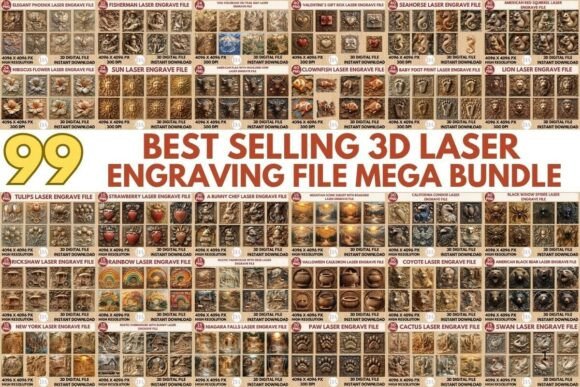
The evolution of laser engraving technology has transformed a simple marking process into a sophisticated art form capable of producing stunning three-dimensional effects. For professionals, makers, and creative entrepreneurs, the difference between a flat etch and a tactile, photo-realistic relief often lies in the quality of the source file. This is where the 3D Laser Engraving File Mega Bundle becomes an indispensable resource. By providing access to ninety-nine meticulously crafted designs, this collection addresses one of the most significant hurdles in digital fabrication: the time-consuming process of converting two-dimensional images into high-fidelity, depth-ready formats.
Understanding the technical nuances of 3D laser engraving requires more than just owning a capable machine; it demands assets that are optimized for the specific physics of light interaction with various materials. The files included in this bundle are not merely standard images but are engineered as grayscale maps that dictate laser power intensity across every pixel. This approach allows creators to achieve nuanced shading, smooth gradients, and realistic textures on surfaces ranging from hardwoods and acrylics to leather and coated metals.
The Technical Foundation of High-Resolution Grayscale Mapping
To appreciate the value of a curated library like the 3D Laser Engraving File Mega Bundle, one must first understand how 3D laser engraving functions. Unlike traditional vector cutting, which follows a path, 3D engraving relies on raster scanning. The laser head moves back and forth, firing pulses at varying intensities based on the brightness of the image pixels. In a grayscale map, black typically represents the deepest cut or highest power, while white represents no engraving. The shades of gray in between determine the intermediate depths, creating the illusion of volume and contour.
The resolution of these maps is critical. The files in this bundle are provided at a staggering 4096 x 4096 pixels. This high resolution ensures that when the design is scaled to fit larger workpieces, the image does not pixelate or lose its gradient smoothness. For users operating advanced CO₂ lasers or fiber markers, this level of detail is essential for avoiding banding artifacts—visible lines that occur when gradient steps are too coarse. The transparent background variants included in the package further enhance usability, allowing designers to overlay these 3D elements onto custom backgrounds or combine multiple designs without tedious manual editing in software like Photoshop or Illustrator.
Versatility Across Materials and Machine Types
One of the primary advantages of utilizing pre-optimized files is their adaptability across different substrates and hardware configurations. The 3D Laser Engraving File Mega Bundle is designed to be universally compatible with a wide array of equipment, including popular desktop units like Glowforge, xTool, Ortur, and Atomstack, as well as industrial-grade CNC routers and fiber laser systems. However, the material being engraved plays a pivotal role in the final outcome, and understanding this interplay is key to leveraging these files effectively.
When working with wood, such as walnut, maple, or birch plywood, the natural grain interacts with the laser burns to create organic, rustic textures. The deep shadows in the grayscale files translate into charred recesses, while the lighter areas remain closer to the surface, highlighting the wood's natural beauty. For acrylic, particularly cast acrylic, the laser creates a frosted, white contrast against the clear or colored material. Here, the precision of the 4096-pixel resolution ensures that the transition between clear and frosted areas is seamless, producing a glass-like 3D effect that is highly sought after in award plaques and decorative signage.
Leather and stone present unique challenges and opportunities. On leather, the laser singes the surface, creating a rich, dark brown embossing effect that mimics traditional tooling. The smooth gradient tones in the bundle’s files prevent the leather from looking burnt or uneven, instead giving it a premium, handcrafted appearance. Similarly, when engraving on slate or coated metals, the removal of the top layer reveals the contrasting color beneath. The high-contrast clarity of these PNG files ensures that even fine details, such as facial features in portraits or intricate patterns in mandalas, remain sharp and recognizable.
Streamlining the Workflow for Professionals and Hobbyists
Time is a valuable commodity for both commercial engravers and hobbyists. Creating a high-quality 3D engraving file from scratch involves complex steps: selecting a source image, removing the background, converting it to grayscale, adjusting curves and levels to enhance depth, and applying noise reduction to prevent speckling. This process can take hours per image and requires a steep learning curve in image editing software. By integrating the 3D Laser Engraving File Mega Bundle into your workflow, you eliminate this preparatory bottleneck.
Each of the ninety-nine designs has been professionally optimized for immediate use. Whether you are using LightBurn, EZCAD, RDWorks, or CorelDRAW, the files are ready to import. The inclusion of both grayscale and coloring PNG versions offers flexibility. The grayscale versions are ideal for direct depth mapping, while the coloring versions can be used for reference or for multi-pass color engraving techniques if your machine supports it. This instant digital download model means that creators can respond quickly to client requests or market trends without being bogged down by technical prep work.
For educators and researchers, this bundle serves as an excellent teaching tool. It allows students to study how different tonal values translate into physical depth. By experimenting with these pre-made files, learners can focus on mastering machine settings—such as speed, power, and frequency—rather than struggling with image preparation. This hands-on approach accelerates the learning curve and helps users develop an intuitive understanding of how laser parameters affect material removal.
Expanding Creative Horizons and Commercial Opportunities
Beyond technical efficiency, the 3D Laser Engraving File Mega Bundle opens doors to new creative avenues and revenue streams. The diverse range of designs includes portraits, animals, landscapes, and abstract patterns, catering to various market niches. Custom portrait engraving is a lucrative service, and having access to high-quality base files allows businesses to offer personalized products with minimal turnaround time. Similarly, decorative home decor items, such as wall art made from layered wood or acrylic, benefit greatly from the realistic depth shading provided in these files.
Makers who participate in craft fairs or online marketplaces like Etsy can differentiate their products by offering true 3D relief engravings rather than flat marks. The tactile nature of these designs adds perceived value, allowing for higher pricing points. Furthermore, the ability to produce consistent, high-quality results builds brand reputation and customer trust. When clients see the fine texture and stunning detail achievable with these files, they are more likely to return for future projects or recommend the service to others.
It is also worth noting the importance of experimentation. While the files are optimized, every machine and material batch behaves slightly differently. Users are encouraged to perform test runs on scrap material to fine-tune their settings. Factors such as lens focal length, air assist pressure, and material density can influence the final depth and contrast. By starting with a known high-quality file from the bundle, users can isolate variables and dial in their machines more effectively than if they were troubleshooting both the file quality and machine settings simultaneously.
Maximizing Value Through Strategic Implementation
To get the most out of the 3D Laser Engraving File Mega Bundle, consider organizing your library by material type or project category. Create folders for portraits, nature scenes, and geometric patterns. This organization saves time when searching for the right design under deadline pressure. Additionally, keep a log of successful settings for each material used with specific files. Over time, this database becomes a proprietary asset that enhances your operational efficiency.
Collaboration is another area where this resource shines. Designers who do not own laser equipment can partner with local makerspaces or fabrication labs. Providing them with these high-resolution, ready-to-engrave files ensures that the vision is executed accurately. The transparency and professional quality of the PNGs facilitate smooth communication between designers and fabricators, reducing errors and reworks.
In conclusion, the shift towards 3D laser engraving represents a significant advancement in digital manufacturing. The 3D Laser Engraving File Mega Bundle is not just a collection of images; it is a toolkit for achieving professional-grade results with greater ease and consistency. By leveraging these ninety-nine unique, high-resolution designs, creators can push the boundaries of what is possible with their laser engravers, CNC machines, and 3D carvers. Whether you are looking to enhance your artistic portfolio, streamline your production workflow, or expand your commercial offerings, this bundle provides the foundational assets needed to bring your creative visions to life with precision and depth.